Event Projection Mapping at Any Scale: What to Rent and Who Does the Work
· By admin · AV, Displays & Live Streaming
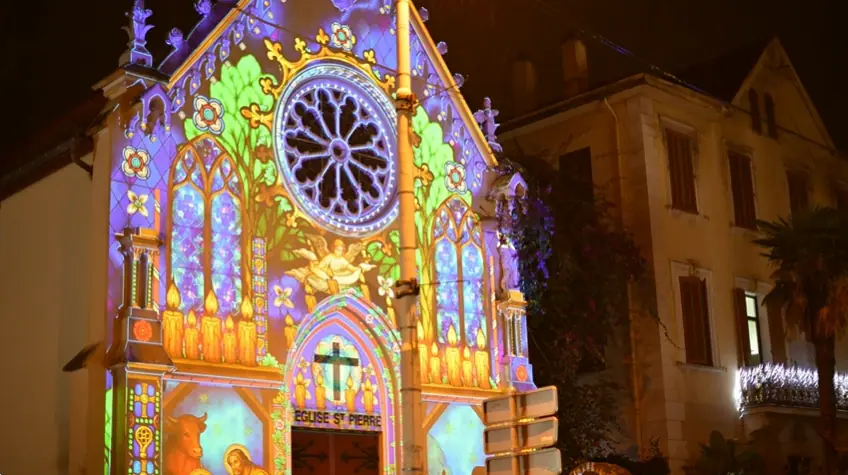
Projection mapping turns a building, a stage, or a set piece into a moving image for an event.
The content is built to fit the exact shape of the surface, so the picture follows windows, edges, and scenery instead of sitting on a flat screen. Most of the work happens before show night: choosing the surface, matching projectors to it, building content for that shape, and deciding who runs playback. If any of those steps is skipped, the image can spill past the building or look washed out.
This guide is for agencies, event producers, venues, and touring shows. It covers how projection mapping scales from one building to a whole city, what a projection mapping rental includes, the engineering roles behind a mapped show, how to plan a holiday building projection, and how tour production offices rent equipment city by city. Rentacomputer.com has coordinated business and event technology rentals nationwide since 1987.

Start With the Surface, the Light, and the Throw
Three things decide whether projection will work for your event.
The surface
Building projection uses a facade, and a facade is rarely a clean rectangle. Windows, columns, ledges, and setbacks all become part of the design. 3D projection mapping on a stage set works the same way: the content is cut to fit the real object.
The light
Projection looks best in darkness. Street lamps, lit windows, and stage lighting are common reasons a mapped image looks weak. Find out where the light comes from before you show a client a rendering.
The throw
Throw distance is how far the projector sits from the surface. It affects lens choice, brightness, and where the gear can go. Measure it, and ask the venue where you are allowed to place and rig equipment.
When an LED screen is the better choice
If the show runs in a bright room, plays mostly live camera and sponsor content, or has to be seen from far away in daylight, an LED screen is usually the better rental. LED screens, outdoor LED video walls, and mobile LED screen trailers stay visible in conditions where a projected image would wash out. For help choosing between a wall and a single large display, see our guide to an LED video wall or a large TV.
From One Building to a Whole City
Projection mapping scales up, and the planning grows with it.
A single facade
A church, a museum, or a historic building is a common first project. Stone, brick, and carved detail all become part of the design, so the content is fitted to every window and edge. Older buildings often come with rules about what can be mounted or rigged, so get permission early.
Larger architecture
A castle, a stadium wall, or a campus landmark usually needs several projectors blended into one image. More projectors means more playback outputs, more power, and more time for alignment on site.
Concert stages
On a stage, the mapped surface is the set, and the image has to read from the front row and from the back of the crowd. Projection often works alongside LED screens and video walls, with show control keeping both in sync.
City-scale shows
When a show spans several buildings or a whole district, each building is its own projection position with its own power, permits, and sight lines. Playback across all of them has to be synchronized. These shows take the longest to plan, so contact us as soon as the dates are set.
What a Projection Mapping Rental Includes
Projectors for projection mapping
Large-venue and higher-output projectors, with lenses that match the throw distance you measured. Projector rentals cover standard meeting rooms through large-venue systems.
Playback computers and workstations
A mapped show needs computers to play the content and, often, more powerful computers to build it. Playback machines and higher-powered desktops and workstations are available to rent. Teams that design while traveling use mobile workstation laptops for rendering, 3D, and visualization work instead of shipping a desktop.
Signal processing and power
Plan for a scaler or processor, cabling, and enough power for the projectors and computers. Video scalers and event power should be part of the same plan as the projectors, settled well before load-in.
We do not list brightness or pixel pitch here because the right numbers depend on your surface, your lighting, and your viewing distance. Send those details with your quote request and we will match the equipment to them.
The Engineering Roles Behind a Projection Mapping Show
Lining an image up with a building takes skilled people as well as hardware. These are the roles involved, using the names crews use:
- Projection design decides what is projected, from where, and how the image meets the surface.
- Media server programming builds the playback so each projector gets the right part of the picture, lined up and on cue.
- Show control connects playback with lighting, sound, and other cues so the show runs as one system.
- Video engineering manages the signal path from the playback system to the projector or LED wall, including formats and troubleshooting.
- Live screen switching is the job of cutting between sources during the show. At a high-profile event, mistakes are visible to the whole audience.
- LED playback engineering prepares and runs content for an LED wall, which is a different job from feeding a projector.
Rentacomputer.com rents the equipment and coordinates delivery, setup support, and pickup nationwide. We do not design projection content or program media servers in-house. That work sits with your content team, or with a projection and content partner we can connect you with. Let us know which applies when you ask for a quote.
Content: Motion Graphics Built for the Surface
Content for a mapped show is made for one specific surface. A standard slide deck or video will not line up with it. The files follow the real shape of the surface and should be approved by the client before they are final.
- Motion graphics for events are cut to fit the facade or the set.
- Experiential and immersive content for activations, museums, and theme park and festival shows also needs a plan for how people move through the space.
- A client preview should be scheduled before the files are locked. Late changes to mapped content can mean rebuilding it to fit the surface again, not just editing text.
Rentacomputer.com rents the computers this work runs on. Media production rentals cover editing and graphics workstations, and video production support covers show-side displays and playback computers.
Planning a Holiday Building Projection
Holiday building projection leaves little room to move dates, because the show is announced to the public and the building is fixed. Cities, venues, and campuses run these shows every winter, often on the same equipment setup with new content each year.
- Confirm the building first. Get permission, confirm power, find out where projectors can sit, and learn what the venue does not allow after dark.
- Ask about historic buildings. Churches and older landmarks may limit what can be mounted, rigged, or plugged in. Get those rules before you design.
- Survey before you design. Use current photos and measurements of the facade, not an old picture.
- Leave time for approvals. Seasonal content often goes through more reviewers than a private event, and mistakes are visible to the public.
- Decide between projection and LED early. A brightly lit plaza may call for an outdoor LED video wall or a mobile LED screen trailer instead of projectors. That choice changes the power plan and the content size.
Send your dates as soon as the venue confirms them.
Tour Production Office Rentals, Booked by the Tour Manager
Touring shows rent equipment for the stage and also for the production office that runs each stop. In each city, the office usually needs printers for scripts and run sheets, laptops, and a few production assistant workstations with desks. Most tours rent this gear locally at each stop.
Printers, laptops, and workstations
Printer rentals, laptop rentals, and desktop and workstation rentals cover the office equipment. Temporary office technology and event furniture cover the workspace. Add a hotspot if the venue network is not reliable enough for a show day.
Who places the order
The tour manager places the order, not the artist’s management. The tour manager decides what gets rented and who pays in each city. Send the city list and dates with your quote request.
TV and live event production offices rent the same way. See concert production support for backstage offices and touring stops.
What to Send With a Quote Request
Including these details helps us prepare an accurate quote sooner:
- City, venue, and dates, plus load-in and strike times
- Indoor or outdoor, and a short description of the surface
- What you know about ambient light, throw distance, and power on site
- Projection, LED, or both, and whether you need a mobile LED screen trailer
- Who owns content and playback: your team, or a partner you still need
- Production office needs, if any: printers, laptops, production assistant workstations, and desk count for each city
Frequently Asked Questions
What is event projection mapping?
Projection built for a specific surface at a live event, such as a stage, a set piece, or a building, with content made to fit that shape.
What does a projection mapping rental include?
Projectors matched to the throw distance, playback computers, signal processing, and power. LED screens or a mobile LED screen trailer can be added or used instead when the lighting calls for it.
Can I rent projectors for projection mapping?
Yes. Projector rentals range from meeting room units to large-venue systems used for projection mapping and long-run events.
Who programs the media server?
Your content and engineering team, or a projection partner. Rentacomputer.com provides the computers and coordinates the rental. We do not program media servers.
How is 3D projection mapping different from building projection?
Building projection describes the surface, usually a facade. 3D projection mapping describes the content, which is built around the depth and real shape of the surface. A building show can be both.
Who rents tour production office equipment?
The tour manager, in each city. A typical order is printers, laptops, and a few production assistant workstations, rented locally rather than shipped from stop to stop.
Build Your Complete Projection Mapping Rental Package
Planning a building projection, a mapped stage, or a tour production office? Request a quote from Rentacomputer.com.
 Our account manager Randy Moore helps agencies, event producers, venues, and touring teams plan the hardware behind projection mapping shows and production offices nationwide. From projector rentals and LED screens and video walls to workstations, mobile workstation laptops, laptops, and printers, Randy can help match the rental to your surface, venue, and schedule.
Contact Randy Moore today at 1-800-736-8772 ext. 225 or submit a fast and easy online quote request.
Related reading